Often described as the “Amazon of China”, Taobao is China’s largest online marketplace, connecting millions of buyers with sellers across the country. Unlike Amazon, however, Taobao is designed primarily for Chinese users, meaning the app is almost entirely in Mandarin. For many expats and international students, opening the app for the first time can feel overwhelming.
In this guide, we’ll walk you through everything you need to know, from creating your account and finding reliable products to understanding delivery, payments and returns. Along the way, you’ll also pick up useful Chinese vocabulary that will make shopping online much easier.
Key Takeaways
- Taobao is China’s largest online shopping platform and one of the most useful apps for anyone living in China.
- Features like reverse image search, customer reviews and seller ratings make it easy to find reliable products.
- Learning a few common Chinese shopping terms will help you navigate the app with confidence.
- Understanding how payments, shipping and returns work can help you avoid common mistakes when shopping online.

1. Getting Started: Setting Up Your Taobao Account
Before you can start shopping, you’ll need to create a Taobao account. While the registration process is straightforward, there are a few things you’ll need before getting started.
What You’ll Need
Most users will need:
- A Chinese mobile phone number
- A Taobao account
- An Alipay account linked to a bank card
- A delivery address in mainland China
If you’ve recently arrived in China, it’s worth setting up Alipay (支付宝 Zhīfùbǎo) first, as it’s the most commonly used payment method on Taobao.
Tip: If you’re still waiting to open a Chinese bank account, some international bank cards may work with Alipay depending on your country and account setup, but functionality can vary.
Useful Registration Vocabulary
| chinese | pinyin | meaning |
|---|---|---|
| 注册 | zhùcè | to register |
| 登录 | dēnglù | to log in |
| 手机号码 | shǒujī hàomǎ | mobile phone number |
| 密码 | mìmǎ | password |
| 验证码 | yànzhèngmǎ | verification code |
| 收货地址 | shōuhuò dìzhǐ | delivery address |
These are some of the first words you’ll encounter when creating your account, and they’re worth remembering if you’re learning Mandarin.
2. Navigating the Taobao Marketplace
Once you’ve signed in, you’ll immediately notice just how much Taobao has to offer. With millions of products available, finding exactly what you’re looking for can seem overwhelming at first—but a few simple features make browsing much easier.
Search Using Chinese Keywords
Although Taobao occasionally recognises English search terms, you’ll almost always find more products by searching in Chinese.
For example, instead of searching for “water bottle”, searching 水杯 (shuǐbēi) will usually return far more results.
If you don’t know the Chinese name of an item, don’t worry. A translation app like Google Translate or Pleco can quickly help you find the correct word before searching.
Learning these everyday shopping words is also a great way to expand your practical Chinese vocabulary while living in China.
🔍 Use Reverse Image Search
One of Taobao’s most useful features is its built-in image search.
Simply tap the camera icon in the search bar and either:
- Upload a screenshot
- Take a photo
- Select an image from your phone
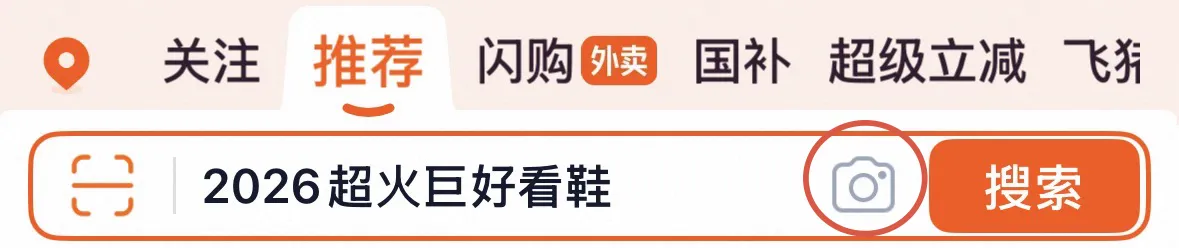
Taobao will scan the image and display visually similar products from different sellers.
This is particularly useful if you’ve seen something on Xiaohongshu, Instagram or in a shopping mall and want to find it online—often at a lower price.
Filter Your Results
After searching, you’ll often see hundreds—or even thousands—of results.
Instead of scrolling endlessly, use Taobao’s filters to narrow your search.
Some of the most useful filters include:
| chinese | pinyin | meaning |
|---|---|---|
| 综合 | zōnghé | recommended |
| 销量 | xiāoliàng | best-selling |
| 价格 | jiàgé | price |
| 包邮 | bāoyóu | free shipping |
| 品牌 | pǐnpái | brand |
Sorting by 销量 (Xiāoliàng) is often a good starting point, as products with high sales usually have a larger number of customer reviews.
Save Products for Later
Not ready to buy yet?
Taobao allows you to save products to revisit later.
Look for:
- 收藏 (Shōucáng) — Add to Favourites
- 加入购物车 (Jiārù Gòuwùchē) — Add to Cart
Using your favourites list is a great way to compare similar products before making a purchase, especially if you’re deciding between different sellers or waiting for a sale event like Double 11 (双十一).
Shop from Official Flagship Stores
One easy way to avoid counterfeit products is by purchasing from Official Flagship Stores (官方旗舰店 Guānfāng Qíjiàndiàn).
These are verified stores operated directly by brands or authorised distributors and are especially useful when buying:
- Electronics
- Skincare
- Cosmetics
- Sportswear
- Designer brands
Although prices may be slightly higher than those from smaller sellers, you’ll generally receive greater quality assurance and after-sales support.
3. Understanding Product Pages
Once you’ve found a product you like, don’t rush to click Buy Now. Taking a few extra minutes to understand the product page can help you avoid poor-quality items, incorrect sizes and unreliable sellers.
Fortunately, Taobao provides plenty of information to help you decide whether a product is worth purchasing.
Read the Product Description
Most product pages include a detailed description with photos, specifications and measurements. Scroll down to the 详情 (Xiángqíng) section to find information such as:
- Materials
- Product dimensions
- Available colours
- Size guides
- Care instructions
If you’re buying clothing or shoes, don’t rely on the size shown in the product title alone. Chinese sizing often differs from European and North American sizing, so it’s always worth checking the measurements in centimetres before placing your order.
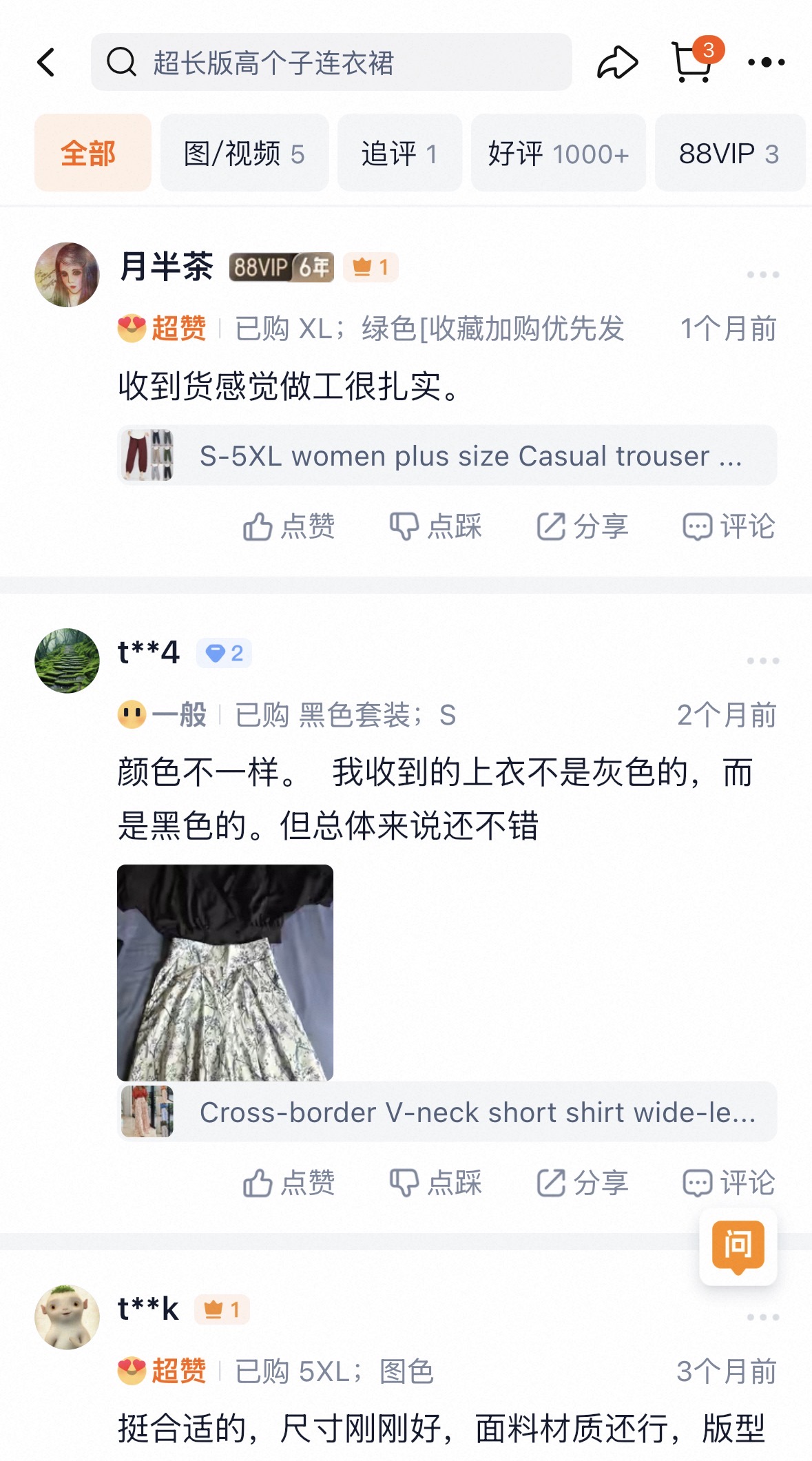
Check Customer Reviews
One of Taobao’s biggest advantages is the huge number of customer reviews available for most products.
Before making a purchase, spend a few minutes reading recent reviews and, more importantly, looking through customer photos. These often give you a much more realistic idea of the product than the seller’s professionally edited images.
Pay particular attention to reviews mentioning:
- Product quality
- Delivery speed
- Sizing accuracy
- Packaging
- Whether the item matches the description
Products with hundreds—or even thousands—of genuine reviews are generally a safer choice than listings with very little customer feedback.
Look at Monthly Sales
Another quick way to judge a product’s popularity is by checking its monthly sales, shown as 月销 (Yuèxiāo).
A high monthly sales figure usually indicates that:
- The product is popular.
- The seller is active.
- Many customers have already purchased the item.
While a high sales number doesn’t always guarantee quality, it’s often a useful indicator when comparing similar products.
Compare Different Sellers
It’s common to find exactly the same product being sold by multiple stores at different prices.
Rather than immediately buying the cheapest option, compare:
- Customer ratings
- Number of reviews
- Monthly sales
- Product photos
- Delivery times
- Whether the store is an Official Flagship Store (官方旗舰店)
Sometimes paying a few yuan more can mean faster shipping, better customer service and a higher-quality product.
Check Store Ratings
Every Taobao store has its own reputation, so it’s worth taking a quick look before ordering.
Some useful things to check include:
- Overall store rating
- Customer satisfaction
- How long the store has been operating
- Response time to customer enquiries
Stores with consistently high ratings and thousands of completed orders are usually the safest choice, particularly when purchasing electronics, cosmetics or higher-value items.
Save Money with Coupons
Before checking out, don’t forget to look for available discounts.
Many stores offer:
- 优惠券 (Yōuhuìquàn) — Coupons
- Store discounts
- Free shipping promotions
- Multi-buy offers
Coupons can often be collected with a single tap before adding an item to your basket, helping you save money without any extra effort.
4. Payment, Delivery & Returns
Once you’ve found the perfect product, the final steps are paying for your order, tracking its delivery and knowing what to do if something isn’t quite right.
Fortunately, China’s e-commerce system is one of the fastest and most efficient in the world. Most purchases can be completed in just a few taps, and many orders arrive within one to three days.
Paying for Your Order
Taobao is fully integrated with Alipay (支付宝 Zhīfùbǎo), China’s most popular digital payment platform. In some cases, you may also be able to pay using WeChat Pay or an international card linked to Alipay, depending on your account setup.
Before confirming your order, double-check:
- Your delivery address
- Colour and size selections
- Quantity
- Shipping method
- Payment method
Once everything looks correct, tap 立即购买 (Lìjí Gòumǎi), meaning “Buy Now”, to complete your purchase.
Tracking Your Order
One of the best things about shopping on Taobao is how easy it is to keep track of your parcel.
After placing your order, you’ll receive real-time updates showing exactly where your package is throughout the delivery process.
Some common delivery statuses include:
| chinese | pinyin | meaning |
|---|---|---|
| 待发货 | dài fāhuò | waiting to be dispatched |
| 已发货 | yǐ fāhuò | dispatched |
| 运输中 | yùnshū zhōng | in transit |
| 派送中 | pàisòng zhōng | out for delivery |
| 已签收 | yǐ qiānshōu | delivered |
Most deliveries within mainland China arrive within 1–3 days, although orders shipped from more remote provinces may take slightly longer.
Should You Buy Shipping Insurance?
When checking out, you’ll often notice an option called 运费险 (Yùnfèixiǎn).
This is shipping insurance, and it usually costs only a few yuan.
If you decide to return an item, this insurance can cover the return postage, making it especially worthwhile when purchasing:
- Clothing
- Shoes
- Electronics
- Higher-value items
- Products you’re unsure about
For such a small additional cost, it’s often worth adding for extra peace of mind.
Understanding Returns
Even experienced Taobao shoppers occasionally receive something that isn’t quite what they expected.
Perhaps the size doesn’t fit, the colour looks different in person or the item arrives damaged.
Before purchasing, it’s worth checking whether the listing includes 7天无理由退货 (Qītiān Wúlǐyóu Tuìhuò), which means 7-day no-reason return. This allows customers to return eligible products within seven days, provided they meet the seller’s conditions.
Many sellers also display additional after-sales services under the 服务 (Fúwù) section of the product page.
Need to Return an Item?
The return process on Taobao is generally straightforward, but there are a few important steps to follow to ensure your refund is processed smoothly.
Rather than covering every step here, we’ve put together a dedicated Taobao Return Guide that walks you through the entire process, from requesting a return to receiving your refund.
If you’re buying clothing or expensive products, reading the return guide before placing your order can save you both time and money.

5. Helpful Chinese Words You’ll See on Taobao
Even if you don’t speak Mandarin, learning a few common words used throughout the Taobao app can make shopping much easier.
Rather than translating every page with another app, recognising these frequently used buttons and labels will help you browse products, compare sellers and complete your purchase more confidently.
Here are some of the most useful words you’ll come across while shopping on Taobao.
| chinese | pinyin | meaning | where you’ll see it |
|---|---|---|---|
| 搜索 | sōusuǒ | Search | Search bar |
| 首页 | shǒuyè | Home | Homepage |
| 分类 | fēnlèi | Categories | Browse menu |
| 加入购物车 | jiārù gòuwùchē | Add to Cart | Product page |
| 立即购买 | lìjí gòumǎi | Buy Now | Checkout |
| 收藏 | shōucáng | Add to Favourites | Product page |
| 包邮 | bāoyóu | Free Shipping | Product listings |
| 官方旗舰店 | guānfāng qíjiàndiàn | Official Flagship Store | Store information |
| 客服 | kèfú | Customer Service | Chat with seller |
| 评价 | píngjià | Reviews | Product page |
| 月销 | yuèxiāo | Monthly Sales | Product page |
| 优惠券 | yōuhuìquàn | Coupon | Product page |
| 发货 | fāhuò | Dispatch | Order tracking |
| 快递 | kuàidì | Express Delivery | Shipping information |
| 我的淘宝 | wǒ de táobǎo | My Taobao | Account page |
These simple words appear on almost every product page and become surprisingly easy to recognise after using the app a few times.
A Few Shopping Terms Worth Knowing
There are also a few words you’ll regularly encounter while comparing products.
官方旗舰店
Guānfāng Qíjiàndiàn
This means Official Flagship Store. These shops are operated directly by brands or authorised retailers and are generally the safest place to buy branded products.
包邮
Bāoyóu
If you see 包邮 on a product listing, it means free shipping. Many sellers offer free delivery within mainland China, making it a useful label to look out for.
月销
Yuèxiāo
This shows the product’s monthly sales. A higher monthly sales figure often indicates that a product is popular and frequently purchased.
优惠券
Yōuhuìquàn
Many sellers offer digital coupons that can be collected before checkout. Spending a few seconds checking for available coupons can often save you money.
Need to Chat with a Seller?
This guide focuses on helping you navigate the Taobao platform, but sometimes you’ll need to contact a seller directly, for example, to ask whether an item is in stock, confirm delivery times or request an exchange.
We’ve put together a dedicated guide covering the most useful Chinese phrases for shopping on Taobao, including practical questions you can copy and use when chatting with customer service.
Learning just a handful of these expressions can make communicating with sellers much easier, even if you’re only beginning to learn Mandarin.
Shopping Like a Local Starts with Confidence
Using Taobao for the first time can seem intimidating, but once you understand the basics, it’s easy to see why it’s become an essential part of daily life in China. From finding the best deals and comparing products to tracking deliveries and managing returns, Taobao makes shopping fast, convenient and affordable.
While translation tools can certainly help, learning even a little Mandarin can make the experience much smoother. Understanding product descriptions, recognising common shopping terms and communicating with sellers all become much easier as your Chinese improves.